Blog 6: Linear Search vs Binary Search (Complete Understanding)
Learn the difference between Linear Search and Binary Search with simple examples and diagrams. Understand when to use each, their time complexity, and how Binary Search reduces steps drastically. #DSA #Searching #BinarySearch #LinearSearch #Algorithms #Coding #Programming #Tech

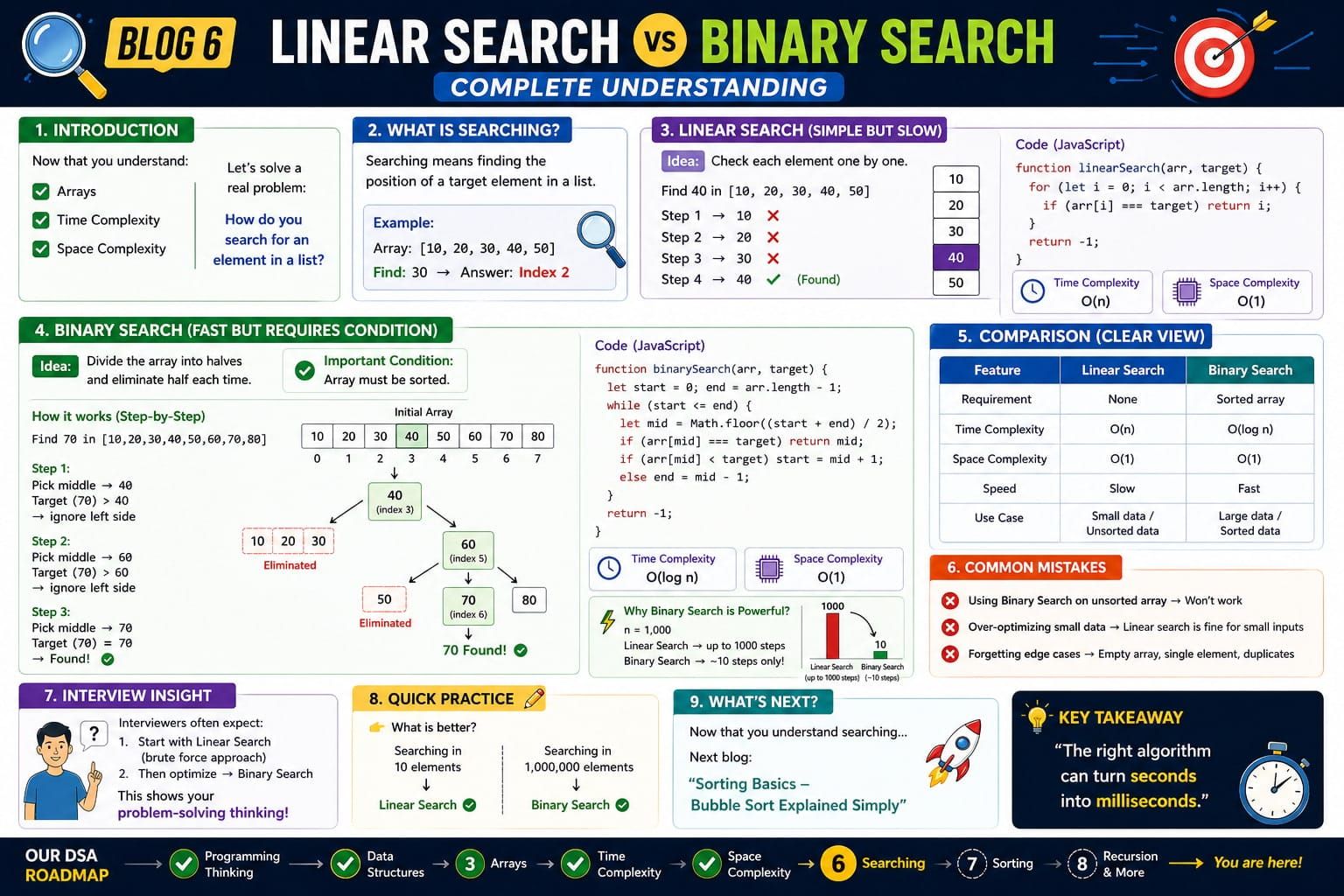
Introduction
Now that you understand:
Let’s solve a real problem:
How do you search for an element in a list?
There are two common ways:
- Linear Search
- Binary Search
🔍 What is Searching?
Searching means:
Finding the position of a target element in a list
Example:
Array: [10, 20, 30, 40, 50]

Find: 30 → Answer: Index 2
1) Linear Search (Simple but Slow)
⚡ Idea
Check each element one by one
How it works
Find 40 in [10, 20, 30, 40, 50]

Step 1 → 10 ❌
Step 2 → 20 ❌
Step 3 → 30 ❌
Step 4 → 40 ✅ Found
💻 Code (JavaScript)
function linearSearch(arr, target) {
  for (let i = 0; i < arr.length; i++) {
    if (arr[i] === target) return i;
  }
  return -1;
}
⏱ Complexity
- Time: O(n) → Understand Why 🔗
- Space: O(1) → Understand Why 🔗
⚠️ Limitation
👉 Slow for large data
👉 Checks every element
2) Binary Search (Fast but Requires Condition)
⚡ Idea
Divide the array into halves and eliminate half each time
⚠️ Important Condition
Array must be sorted
How it works (Tree Style)
Find 70 in [10,20,30,40,50,60,70,80]

                40
                 \
                 60
                   \
                   70 ✅ Found
Explanation:
👉 Note: Binary Search works on Sorted Array.
Find 70 in [10,20,30,40,50,60,70,80]

Step 1: Pick middle → 40
Target (70) > 40 → ignore left side

                40
                 \

Step 2: New range [50,60,70,80]
Pick middle → 60
Target (70) > 60 → ignore left side

                 60
                   \

Step 3: New range [70,80]
Pick middle → 70 ✅ Found

                   70 ✅
🎯 Key Understanding
At each step, we eliminate half of the array
- First → 8 elements → reduced to 4
- Then → 4 → reduced to 2
- Then → 2 → reduced to 1
👉 That’s why Binary Search is O(log n)
📉 Step Reduction
8 → 4 → 2 → 1

Total steps = 3
💻 Code (JavaScript)
function binarySearch(arr, target) {
  let start = 0;
  let end = arr.length - 1;

  while (start <= end) {
    let mid = Math.floor((start + end) / 2);

    if (arr[mid] === target) return mid;

    if (arr[mid] < target) {
      start = mid + 1;
    } else {
      end = mid - 1;
    }
  }

  return -1;
}
⏱ Complexity
- Time: O(log n)
- Space: O(1)
⚡ Why Binary Search is Powerful?
n = 1,000

Linear Search → up to 1000 steps
Binary Search → ~10 steps
Why Binary Search is O(log n)
👉 Because every step cuts the problem in half
Visual Understanding:
Start with n elements

n
↓ (divide by 2)
n/2
↓
n/4
↓
n/8
↓
...
↓
1 (stop)
🎯 Key Question
👉 How many times can you divide n by 2 until it becomes 1?
Answer:
That count is log₂(n)
Example:
🔹 n = 8
8 → 4 → 2 → 1
Steps = 3
👉 log₂(8) = 3
🔹 n = 16
16 → 8 → 4 → 2 → 1
Steps = 4
👉 log₂(16) = 4
🔹 n = 1024
1024 → 512 → 256 → ... → 1
Steps ≈ 10
👉 log₂(1024) = 10
⚡ Final Intuition
Each step removes half of the remaining elements
So instead of checking n elements (like O(n)),
you only take about log₂(n) steps
🔥 One-Line Answer:
Binary Search is O(log n) because the search space is halved in every step.
⚠️ Important Note
- Base of log doesn’t matter in Big-O
- log₂(n), log₁₀(n), log(n) → all written as O(log n)
⚖️ Comparison (Clear View)
Feature         Linear Search     Binary Search
------------------------------------------------
Requirement     None              Sorted array
Time            O(n)              O(log n)
Speed           Slow              Fast
Use case        Small data        Large sorted data
⚠️ Common Mistakes
❌ Using Binary Search on unsorted array
👉 Won’t work
❌ Over-optimizing small data
👉 Linear is fine for small inputs
❌ Forgetting edge cases
👉 Empty array, duplicates
🎯 Interview Insight
Interviewers often expect:
- Start with Linear Search (brute force)
- Then optimize → Binary Search
👉 Shows problem-solving thinking
🧩 Quick Practice
👉 What is better?
- Searching in 10 elements → Linear is better ✅
- Searching in 1,000,000 elements → Binary is better ✅
🚀 What’s Next?
Now that you understand searching…
👉 Next blog:
“Sorting Basics – Bubble Sort Explained Simply”
✍️ Closing Thought
“The right algorithm can turn seconds into milliseconds.”